
The AI design pattern playbook
A practical reference for every AI system you'll build

Hey there 👋,
When it comes to designing AI systems, it helps to have a high-level view of what patterns are available. You don’t want to reinvent the wheel every time you start a new project.
There are two typical ways to structure LLM applications: workflows and agents.
These aren’t mutually exclusive. A workflow is a graph of steps you define upfront (a → b → c). You control what happens and in what order. An agent is where the LLM controls the flow. It decides what steps to take based on results.
Agents are powerful when you don’t know ahead of time what work needs to be done. Deep research is an example - you can’t predict what searches you’ll need or what rabbit holes matter until you start exploring.
Before we dive in, one principle worth internalising: LLM calls are expensive. Not just in cost, but in latency. Every call you add is another round trip, another few seconds of wait time. Everything in this guide is a trade-off between capability and speed. Always ask: do I really need another LLM call here, or can code handle it?
This is a reference for the patterns I find most useful.
Start Here: The Single LLM Call
This sounds obvious, but it’s worth stating: you can go a long way with a single, well-crafted LLM call.

CV parsing. Email drafting. Structured data extraction. Classification. Summarisation. A single call with a good prompt handles all of these.
Before reaching for frameworks or agents, ask yourself: can one prompt do the job? Often the answer is yes. And when it is, you get the fastest possible response time and the lowest possible cost.
The rest of this guide is for when a single call isn’t enough.
Workflow Patterns
You define the graph. The LLM is one step among many - composed with code, API calls, database operations.
1. Chain
Sequential steps where each builds on the previous.

This is the most common pattern. Do a, then b, then c.
Not every step needs to be an LLM call. You can mix LLM calls with deterministic code. Every LLM call you can replace with deterministic code is latency saved.
2. Parallel
Run independent operations simultaneously.
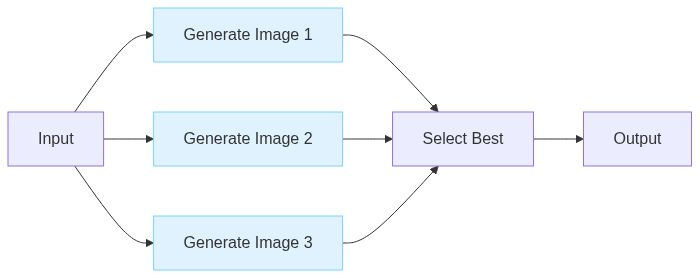
Image generation is the classic example because it’s notoriously slow and each image generation can be parallelised.
If the operations can be done in parallel, it’s a no brainer. Use a semaphore to avoid hitting rate limits.
sem = asyncio.Semaphore(5)

async def generate_image(prompt: str) -> bytes:
    async with sem:
        return await image_model(prompt)

images = await asyncio.gather(
    generate_image("generate an image of ..."),
    generate_image("generate an image of ..."),
    generate_image("generate an image of ..."),
    ...
)
3. Route
This is my favourite pattern. Classify first, then dispatch to specialised handlers.
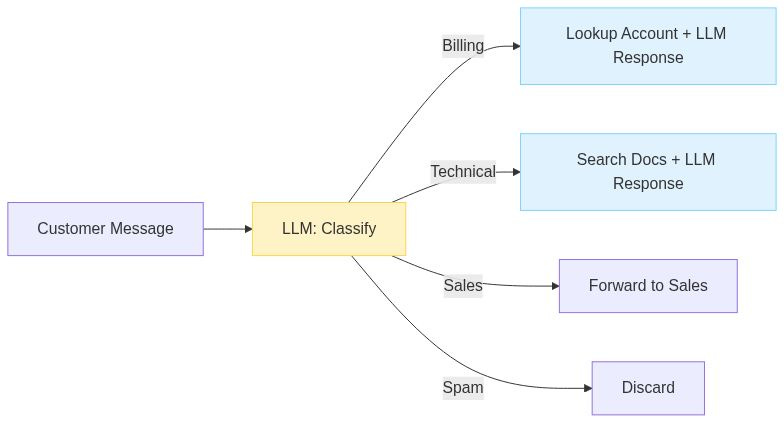
Different inputs need different treatment. Billing questions need account context. Technical questions need documentation RAG. Sales inquiries need a human.
One prompt can’t handle all of this well. Classify first, then route to the appropriate subsystem. Each branch can have its own prompts, tools, even models.
Use a fast, cheap model (or code) for classification. Save the expensive model for the actual work.
4. Map-Reduce
Process many items, then synthesise.
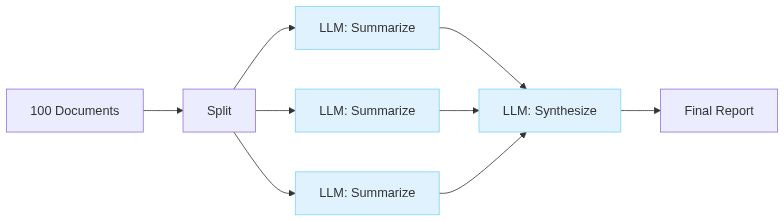
Due diligence across 50 contracts. Research synthesis across 20 papers. Log analysis across gigabytes of files. No way any of this fits in one context window.
The map phase splits out the work. The reduce phase is where you lose information, so be deliberate about it. For critical details, keep structured data rather than summarising to prose too early.
5. Orchestrator-Workers
When you can’t predict the subtasks upfront, but you still want workflow-level control. This is similar to map reduce but with an LLM dynamically making a plan.
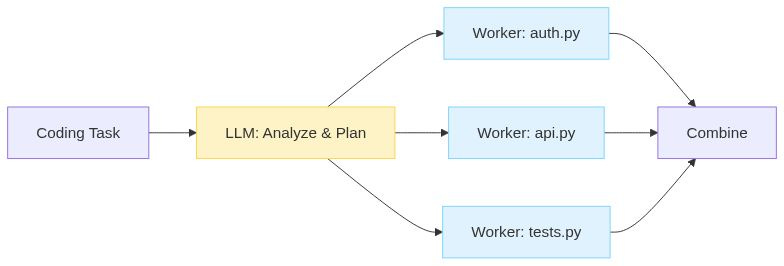
Example: “Add authentication to the app.” Which files need to change? You don’t know until you analyse the codebase.
The orchestrator examines the task and spawns workers (sub agents) dynamically. This is like parallel, but the LLM decides at runtime what workers are needed and what each should do.
6. Evaluate-Refine
Generate, check, improve. Loop until good enough. Most of us do this manually when working with LLMs. We ask a question. Ask for improvements. Keep iterating until done.
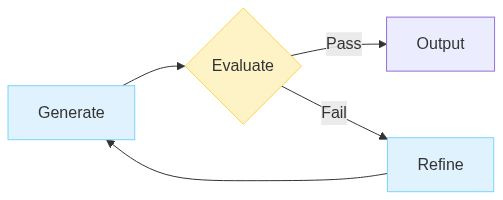
Example: generate a blog post, get feedback from an LLM, improve it based on that feedback.
The evaluator doesn’t have to be an LLM. Code checks are often better. Run the tests. Validate the schema. Lint the output. Deterministic evaluation is faster, cheaper, and more reliable.
7. Fallback
Try cheap first. Escalate when needed.

Most requests are straightforward. “What are your opening hours?” doesn’t need a frontier model.
Route everything through a fast model first. When confidence is low, escalate to something more powerful. This can cut costs dramatically while maintaining quality where it matters.
The trick is reliable confidence detection.
Agent Patterns
Unlike a workflow, an agent makes decision about control flow. The LLM decides what to do next. You provide instructions, tools and set boundaries. The agent decides what tools to call.
8. Tool Loop
The core agent pattern. Call tools until the task is done.
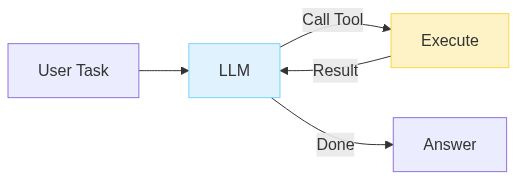
Claude Code is a good example. Read file, make change, run tests, see error, fix error, run tests again. The model decides what to do based on what it observes.
The critical mechanism is feedback. Model writes buggy code - sees the stack trace - fixes it. API returns an error - model adjusts parameters. Without feeding errors back to the model, agents can’t easily self correct.
The obvious downside of agents is loss of control and less predictability in exchange for more power.
9. Plan-Execute
Separate thinking from doing.

Deep research is the canonical use case. You can’t know upfront what searches you’ll need, what sources matter, what rabbit holes are worth exploring. The agent plans an investigation, executes steps, and replans as it learns.
10. Human-in-the-Loop
Pause for approval on high-stakes actions. For a simple terminal agent, this is a trivial if statement:
for tool_call in response.tool_calls:
    if requires_approval(tool_call):
        approved = input(f"Execute {tool_call.name}? (y/n): ")
        if approved != "y":
            continue

    result = execute(tool_call)
That’s really all it is. Before executing sensitive operations - sending emails, making payments, deleting data - ask first.
Auto-approve small refunds. Human review for large ones. Auto-send routine confirmations. Human review for anything sensitive.
This is how you build trust in a new system. Start with humans approving everything. Track what gets approved versus rejected. Identify patterns. Automate the safe categories. Keep humans on the edge cases.
Over time, the system earns more autonomy.
Choosing Between Them
Start with the simplest option: a single LLM call. Only add complexity when you have a clear reason.
Default to workflows over agents. Workflows are predictable, debuggable, and easier to reason about. You know exactly what will happen because you defined the graph.
Reach for agents when you don’t know the steps upfront. Research, coding, customer questions. The flexibility is worth the unpredictability.
Every pattern is a trade-off. The best AI systems aren’t the most sophisticated - they’re the simplest thing that solves the problem.
Thanks for reading. Have an awesome week : )
P.S. If you want to go deeper on building AI systems, I run a community where we build these patterns hands-on: https://skool.com/aiengineer