
4 context engineering strategies every AI engineer needs to know
The thing nobody explains about building AI agents.

Hey friend 👋,
A few months ago, I was building an AI agent to help engineers debug production issues. The idea was simple: pull logs from multiple sources, find patterns, and explain what went wrong.
“Search the logs and tell me why this alert fired.”
The agent would come back with something like:
“At 14:32 UTC, the checkout service started returning 503 errors. The root cause was the Redis cache hitting memory limits. The issue self-resolved at 14:47.”
Incredible, right?
Except it didn’t work.
The log data was massive and noisy. Within a few conversational turns, I’d maxed out the context window. The agent couldn’t keep all those log outputs in memory. It would start strong, then eventually fail or hallucinate.
The solution wasn’t to switch models or add more data. It was to rethink the context management strategy.
What Is Context Engineering?
When you talk to an AI model, it sees more than just your prompts. Your instructions, the conversation so far, tool call results, documents-all of it sits in this window together.
Andrej Karpathy has a useful mental model for this: the LLM is the CPU, and the context window is the RAM. It’s the model’s working memory. Everything has to fit there.
But it’s not just about overflow. Even before you hit the limit, models suffer from “context rot”-performance degrades as more tokens are added, even within the window size.
Think about finding one important note on a desk. Easy with 10 papers. Hard with 1,000. The note is still there-but good luck finding it.
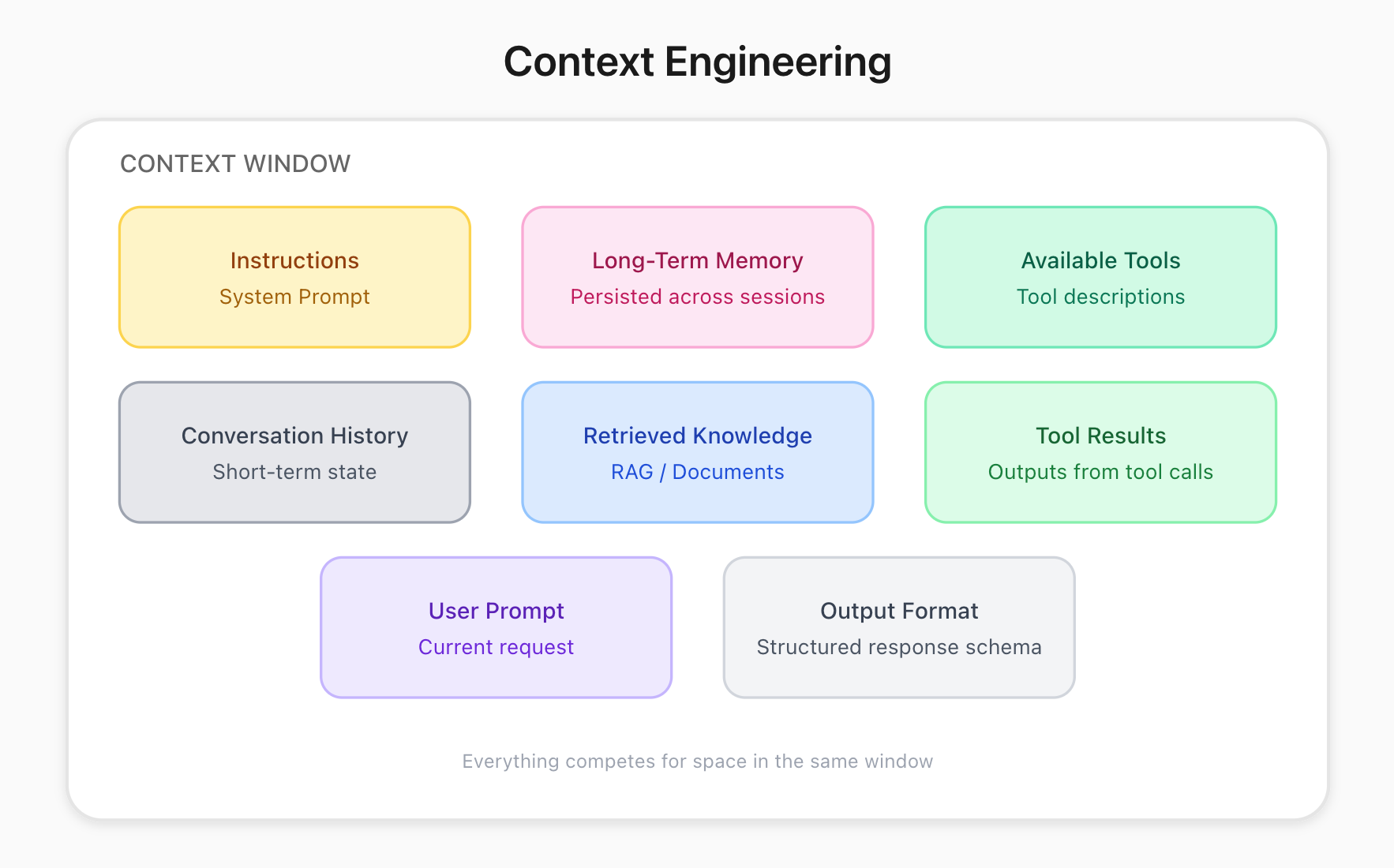
Drew Breunig outlined four ways bad context breaks your agent:
Context Poisoning: A hallucination enters context and corrupts all future reasoning
Context Distraction: Too much context overwhelms the model
Context Confusion: Irrelevant information influences responses
Context Clash: Different parts of the context contradict each other
If your agent works at first then drifts later, one of these is usually why.
Why This Matters For Agents
Here’s the thing that makes this click: LLMs are stateless.
They don’t “remember” anything between calls. Every time you call the model, you pass in the entire conversation history via an API call.
→ User asks a question (20 tokens)
→ Assistant decides to call a tool (50 tokens)
→ Tool returns results (2,000 tokens)
→ Assistant reasons about the results (100 tokens)
→ ...repeat 50 times...
Eventually, you’re passing hundreds of thousands of tokens just to generate the next sentence.
This is the context engineering problem.
The Four Strategies
So how do you actually manage context? There are four main strategies. We’ll use Claude Code (a terminal AI agent) as a reference because it uses all of these.
1. Write (External Memory)
Don’t keep everything in context. Have your agent write important stuff somewhere external.
Claude Code writes its plans to disk. It also uses a TodoWrite tool to persist task state. When debugging a complex issue across 15 files, instead of holding “fixed auth.ts, need to check db.ts, then run tests” in context, it writes each step to a structured todo list. The todos live outside the window-the agent references them when needed, not constantly.
Cursor and Windsurf use rules files. ChatGPT saves memories across sessions. Same idea: give your agent a write_to_scratch tool that writes findings and plans to a file. Those notes don’t cost attention until the agent pulls them back in.
2. Select (Just-in-Time Retrieval)
Some people dump all docs and tools into context upfront. Don’t do this.
Claude Code never reads an entire codebase upfront. It uses Glob to find file paths matching a pattern (e.g., **/*.ts), Grep to locate specific code references, then Read to pull in only the relevant file. A question like “where is authentication handled?” triggers a targeted search-not a 50-file dump into context.
Keep references instead (file paths, database queries). When the agent needs the content, it loads it then. And if you have 50 tools, the model parses 50 descriptions every turn-keep your toolset minimal or dynamically load definitions based on the task.
Claude Skills was a recent feature that used this approach - it read’s a description of the tools - not the “entire” tool definition.
Here’s the algorithm:
Give agent a compressed summary of the tools (“Use this tool if the user asks about LinkedIn posts”)
Read the full tool description dynamically if the agent thinks it’s needed
3. Compress and Prune
Even with a 200k token window, a messy context leads to bad answers.
Summarization: If you’ve used Claude Code, you’ve seen this. When the window fills, it summarizes the conversation-preserving architectural decisions but dropping the exploration that led there.
Context editing (pruning): Sometimes you don’t need a summary. You just need to delete. Anthropic found that simply removing stale tool outputs reduced token usage by 84% on long-running tasks.
Did the agent run a
ls -lacommand 10 turns ago? Delete the output. The model already used that info.Did a tool return 5,000 lines of logs? Summarize it to “Found 847 errors, 92% were Redis timeouts: org.redis.client.RedisTimeoutException: Redis server response timeout (3000 ms) occured for command: (GET),” then delete the raw data.
4. Isolate (Multi-Agent Systems)
This is my favourite technique for complex tasks. Instead of one agent drowning in context, split the work.
Claude Code spawns specialized agents by type: Explore for codebase navigation, Plan for architecture decisions, claude-code-guide for documentation lookup. Each operates in its own context window. If the user asks “how does billing work?” and “what’s in the docs about webhooks?”-two agents run in parallel, each with fresh context, returning focused summaries to the main conversation.
When delegating to a sub-agent, the prompt is compressed: “Find all API endpoints that modify user data” rather than passing the full conversation history. The sub-agent explores freely, then returns a summary. The orchestrator never sees the 30 files the sub-agent read-just the 500-token answer.
Uses more total tokens. Gets better results.
TL;DR
Managing context is important when building long running AI agents. The window quickly fills up.
The counterintuitive thing about context windows is that bigger doesn’t always mean better. A 200k window full of noise performs worse than a 20k window with exactly what matters. Context engineering isn’t about cramming more in. It’s about curating what the model sees.
How to solve this:
Write: Save state to external files.
Select: Load data only when needed.
Compress: Summarise history and delete stale tool outputs.
Isolate: Use sub-agents to encapsulate high-token tasks.
Back to my logs agent: the fix was combining a few of these strategies together. What felt like a model limitation was actually a context engineering problem.
Thanks for reading.
Have an awesome week : )
P.S. If you want to go deeper on building AI systems, I run a community where we build agents hands-on: https://skool.com/aiengineer