
The simplest way to build AI agents in 2026
How to build personal AI agents without frameworks, infrastructure, or unnecessary complexity

Hey there 👋,
You can build a working AI agent with just a folder, a markdown file, and a python script.
No N8N. No LangGraph. No FastAPI. No infrastructure at all.
The AI agent space has convinced people that building agents requires either expensive no-code platforms or serious engineering overhead. I think that’s backwards - at least for personal use.
If you’re a solo builder who wants AI agents that handle your research, automate your workflows, or manage repetitive tasks, you don’t need production infrastructure. You need something you can build in an afternoon and modify in minutes.
I call this the Micro-Agent Architecture. It’s the pattern I use for my own agents, and it’s embarrassingly simple.
The Structure
Here’s everything you need:
my-agent/
├── AGENTS.md
├── tools/
├── context/
└── workspace/
Four folders. Let me show you what each one does.
AGENTS.md (The Instructions)
This is where you tell the agent who it is and what it can do. Think of it as a system prompt you can version control.
Most modern coding agents read this file on startup. For Claude Code just add this to your Claude.md and it will read that file.
@AGENTS.mdHere’s a real example: a research agent I use for YouTube content analysis which can fetch videos, research topics, get video transcripts, and even uploads my videos for me (writing all the metadata, tags, and descriptions):
# YouTube Research Agent

You are a research agent specialising in YouTube content analysis.

## Tools

Use the following tools.

### get_channel_videos

Fetch videos for a YouTube channel. Returns view counts, titles, outlier scores.

uv run tools/youtube.py get_channel_videos @mkbhd --days 30

### get_transcript

Pulls the transcript for a specific video.

uv run tools/youtube.py get_transcript VIDEO_ID
The agent knows its role, knows what tools it has, and knows the workflow for common tasks.
Tools (The Scripts)
Simple scripts that do specific things. Python, Bash, Node. If you don’t know how to code, Claude can just write the scripts for you (“write a python script to fetch youtube videos for a channel. Tell me how to use it”). The LLM reads AGENTS.md, sees the command, runs it. No SDK. No framework. Just scripts.
Context (The Knowledge)
Reference material the agent reads before working. Style guides, templates, examples, SOPs. This is how you make agents consistent-by giving them documentation, the same way you’d onboard a person.
Workspace (The Output)
Where the agent saves its work. Research, drafts, data. Files that persist between sessions. Everything it creates goes here, so you can review it, edit it, and build on it.
As an example, when using my YouTube agent, I store complete video transcripts as files and sometimes refer back to them during conversations.
How It Works
You already have the agent runtime. It’s Claude Code, Codex, Amp - whatever agentic coding tool you’re already using. ANY of them. These tools can read files, follow instructions, and most importantly run commands. That’s all an agent needs.
We treat the agent harness itself (Claude Code, Codex, Goose, Amp) as a building block and largely interchangeable.
Point your tool at the folder and give it a task:
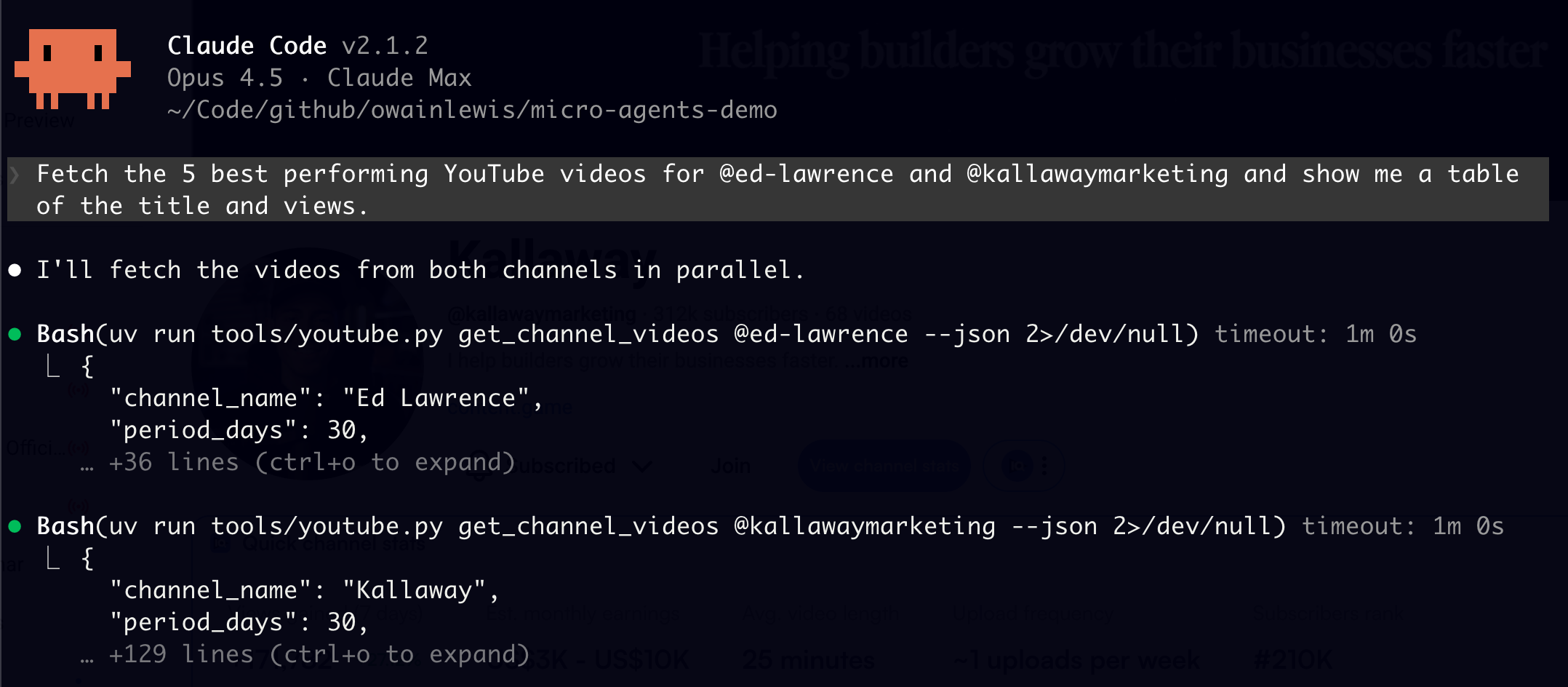
The agent reads AGENTS.md, understands its role, runs the tools, and saves everything to workspace. Real research, done automatically, saved locally.
The folder IS the agent. Instructions are markdown. Knowledge is markdown. Tools are scripts. Storage is files. The agentic coding tool you already have is the runtime.
No deployment. No hosting. No complexity.
The Insight That Makes This Work
Software engineers have been building CLIs and scripts for decades. We write utilities that automate our work. It’s one of the oldest traditions in the craft.
Here’s what I’ve realised: agents are exceptionally good at using CLIs. Better than humans, actually.
Think about it. An agent can read documentation perfectly, remember every flag, and invoke your scripts hundreds of times without getting tired or making typos. Give it a conversational interface and suddenly your little Python script becomes something you can talk to.
Any CLI becomes 100x more powerful when you add an intelligence layer to it.
That YouTube research tool I showed earlier? It’s just a script. But when an agent uses it, it can analyse fifty channels in parallel, cross-reference the results, and synthesise insights I’d never have time to find manually.
And here’s the thing-anything can become a tool. A Python script. A bash one-liner. A Docker container. If it runs from a terminal, an agent can use it.
You’re not learning a new skill. You’re amplifying one you already have.
Why I Use This Instead of Frameworks
For personal agents, frameworks are overhead.
N8N, LangGraph, and similar tools solve real problems - for teams shipping production systems to users. If you’re building agents other people will use, you need observability, APIs, error handling, deployment pipelines, all of it.
But if you’re building agents for yourself? You don’t need any of that. You need something you can modify in two minutes when your requirements change. You need something you can understand completely. You need something that doesn’t break when a framework updates.
A folder of markdown and scripts gives you that. It’s not sophisticated. That’s the point.
The Leverage Angle
A tool helps you once. A system helps you a thousand times.
The Micro-Agent Architecture isn’t about building impressive AI systems. It’s about building personal agents that help 1 person do the work of 10.
Thanks for reading. Have an awesome week : )
P.S: If you want to build agents like this hands-on with other engineers, find more in depth content here: https://skool.com/aiengineer