
I let AI agents run my entire GitHub workflow
Give an agent the GitHub CLI and it can do far more than write code.

Hey friend 👋,
For the past year I’ve used AI agents to run my entire GitHub workflow. If you write code with AI, getting this part right makes a real difference to the quality of your work.
The best engineers I’ve worked with have one thing in common. They follow a repeatable workflow. When you work with AI coding agents, you need the same thing to avoid inconsistent results.
Once your workflow is clear, there’s a simple way to hand the whole thing over: give the agent the GitHub CLI.
In this issue I’ll walk through how I use the GitHub CLI with agents like Codex and Claude Code to run a project end to end. To keep it concrete, I built a small Go command line tool along the way, and the agent did nearly all of it: the repo, the tickets, the code, the reviews, the merges, and a full release pipeline.
Here’s the video if you want to check it out.
Give the agent one tool
Agents can write code. On their own they can’t touch the place your work actually lives. GitHub is where most of us store code, review it, and work together, so that’s the gap to close.
You close it by installing the GitHub CLI. On a Mac it’s two commands:
brew install gh
gh auth login
Once it’s authenticated, the agent can run any GitHub command you can. I tested this by asking for a new repo, without telling it to use the CLI:
Create a new public GitHub repo, initialise it with a README and a Go .gitignore, and set the description to "a CLI tool for managing your agent workspace".It checked whether the CLI was installed, then set the whole thing up. I didn’t touch a thing.
Keep the work on a board, not in markdown files
If you track agent tasks in markdown files on your machine, it gets chaotic fast. You lose sight of what’s done and what’s still in progress.
GitHub project boards are built for this. I asked the agent to create one and link it to the repo. Now every task is a ticket, and as the agents work they move the tickets themselves, so the board always shows what’s done and what’s in progress. It’s also what makes parallel work practical: you can run several agents at once, each on its own ticket, and the board tells you who’s doing what.
Plan first, then break it into tickets
Don’t ask an agent to build the whole thing in one go. Plan it, then split it into tasks you can review one at a time.
I asked for a spec first, and gave the agent a link to the existing project so it could read the API and understand what I was building:
Write a spec for a single-binary Go CLI that lets AI agents operate this project. Here's the codebase: [link].Once the spec looked right, I had it break the work down and push it to the board:
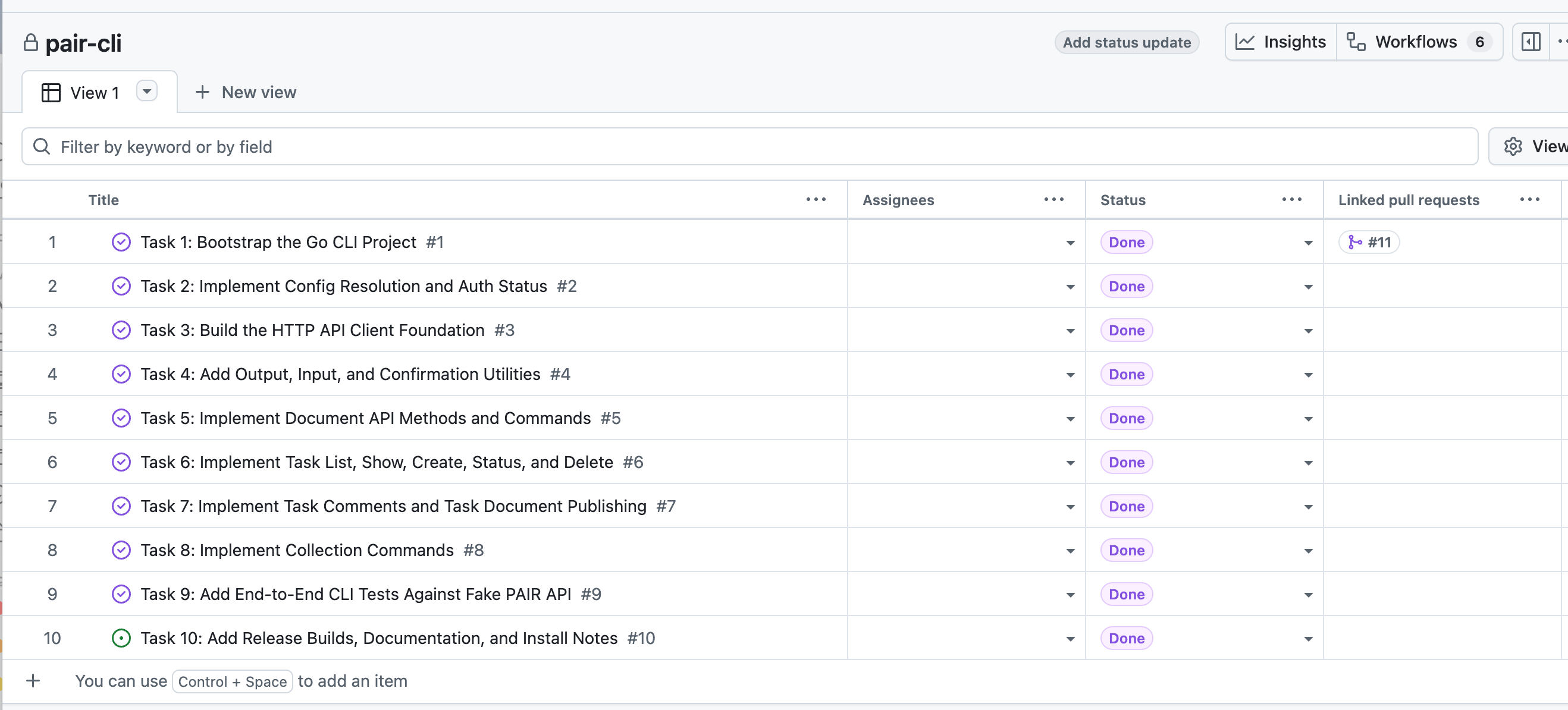
Break this into tasks we can do one by one, then push them all to the project board.That gave me ten tickets, each linked on the board. From there it’s just working through them.
Make the agent review its own work
The first time an agent writes code, there’s usually (always if we’re honest) something wrong with it. So before any code goes up for review, I have it check its own work first.
I use an implementation skill that reminds the agent to review what it just wrote. On the first task it caught a bug in its own code before opening the pull request. It’s a small habit, and it saves you finding the same thing later.
Let the agent run the review cycle
When a task is done, the agent opens a pull request.
I have automated review set up, so when a PR opens, Copilot and Codex review the code and comment on anything they find. Then I send the agent back in to deal with the comments. The prompt I use has one important detail:
Pull down the PR comments with the GitHub CLI and fix them. Only fix the issues you think need fixing. If you disagree with one, say so.That last line matters. You don’t want the agent blindly accepting every suggestion. After it fixes the real issues, I have it reply on each comment to record what changed and where. You’d do the same for a human reviewer who spent time on your code. Then the agent merges the branch and cleans up the stale ones.
At no point did I open GitHub to do any of this by hand.
Automate the boring infrastructure too
This is where it goes past writing code (and get’s really interesting). The CLI tool needs releases people can download, so I had the agent build a release pipeline with GitHub Actions. Here’s the prompt:
Create a GitHub Actions release pipeline. When I push a version tag, check out the code, build binaries for each OS, name them clearly, generate release notes from the commits, and create a GitHub release with the binaries attached.It came back with a plan and one design question worth answering yourself: attach the raw binaries, or bundle them as compressed archives? I went with archives. Then it wrote the whole release yaml: the build matrix across operating systems, the build steps and environment, the naming, and the release notes. Writing that by hand is tedious, and I’ve lost whole afternoons to it over the years.
To fire it, you just push a tag:
git tag v1.0.0 && git push --tagsThe action ran, built the binaries, generated the notes from the commit history, and published a release anyone can download and install. Configuring this by hand can eat an afternoon. The agent did it in minutes.
More ways to put the agent to work
I’ve only scratched the surface here. Once an agent can drive the GitHub CLI, almost any repeatable chore around your repo is fair game. A few more worth trying:
Triage incoming issues: read the new ones, label them, flag duplicates, and ask for any detail that’s missing.
Watch CI on a pull request, read the failing logs, and fix the build without you copying anything across.
Summarise a long pull request before you review it, so you read a plain-English overview instead of wading through the diff yourself.
Keep the change log and release notes current as work merges, instead of scrambling to write them at release time.
Open fixes for dependency and security alerts as small, reviewable pull requests.
Write a Monday digest of what merged last week and what’s still open, pulled straight from the repo.
Tidy as you go: close stale issues, prune merged branches, keep labels consistent.
Where the leverage is
By the end I’d built a working project from scratch: the repo, the board, the code, the reviews, the merges, and an automated release. I’ve been a software engineer a long time, and I’m still struck by how much an agent can do once you give it the right tool.
Notice that I drove each step by hand here, one prompt at a time. But those steps don’t really change from project to project, which points to the next move: once the cycle is repeatable, you can stitch it into one pipeline the agents run end to end, with you stepping in only when something needs a real decision.
The value here isn’t writing code faster, it’s handing over the whole cycle: plan, implement, review, fix, merge, release. So work out your workflow, give your agents the right tools, and let them run it. Next time you catch yourself doing slow, mundane setup by hand, like a release or deploy pipeline, ask whether there’s a CLI an agent could drive instead.
Checkout the video if you want to go deeper.
Thanks for reading.
Have an awesome week :)
P.S. If you want to go deeper on building AI systems, I run a community where we build real projects hands-on: 👉 https://aienginer.co