
From software engineer to AI engineer (the 2026 roadmap)
Everything you need to go from software engineer to shipping production AI: without chasing every new framework

Hey friend 👋,
Breaking into AI Engineering can feel overwhelming.
New tools launch weekly. Tutorials assume you already know everything. Half the advice contradicts the other half. It’s hard to know where to start, or what actually matters versus what’s just noise.
Here’s the good news: it’s simpler than it looks.
AI Engineering is software engineering with LLMs. You’re not training models from scratch or doing research. You’re building products that use language models as one component among many.
AI Engineers spend most of their time on the same things great software engineers focus on: designing reliable systems, writing code, testing properly, and making sure things work in production. The LLM part is maybe 20% of the job. The other 80% is engineering.
This roadmap is the practical path through the noise.
Let’s dive in.
Stage 1: Programming and Architecture
You’re a software engineer first. Everything else builds on this.

Most AI problems are design and architecture problems - the same kind of problems good engineers have always solved. How do the pieces communicate? Where can things fail? Why is latency so high? How do we know if it’s working? How does data flow from input to output? These questions matter more in AI applications than most people realise.
Know when to use different types of databases. Have a mental model for how web services work. If terms like “stateless,” “caching,” or “message queue” are unfamiliar, spend time here before moving on.
One myth to bust early: you don’t need Python. It’s popular and has great ecosystem support, but AI systems are language agnostic. Java developers can use Spring AI and Google’s ADK. TypeScript developers have the Vercel AI SDK and great provider support, Use what you know. What matters is understanding fundamentals, not picking the “right” language.
Don’t skip this stage. People who jump straight to complex AI frameworks end up with impressive demos that fall apart when real users touch them.
Stage 2: Working With LLMs
Now you’re ready to add LLMs to your toolkit.
Start by deeply learning one provider’s API: OpenAI, Anthropic, or Google. Understand how authentication works, how to handle streaming responses, what happens when you hit rate limits, and how to implement proper retry logic. Know what tokens are and why they matter for both context limits and cost.
Think about production inference early. The API you prototype with isn’t always what you’ll use in production. OpenAI in production means Azure OpenAI. Gemini means Vertex AI. Claude is available on AWS Bedrock, Azure (via Microsoft Foundry), and GCP. Enterprise platforms offer better SLAs, compliance guarantees, and network control. The SDKs are similar but not identical: authentication differs, and some features lag behind. Know where your application will run before you’ve built too much to easily switch.
Master the core capabilities that modern LLMs offer:
Text generation: master prompting: writing instructions that get LLMs to do what you want. The simplest and most overlooked strategy for learning is to master meta-prompting (ask AI to refine and improve your prompts).
Structured outputs matter because software systems need predictable structure, not free-form text. Learn how to constrain model outputs to schemas your code can reliably parse.
Tool calling is how LLMs take actions in the world. The model doesn’t just generate text: it decides which function to call and with what arguments. Understand this at the API level before reaching for abstractions.
MCP (Model Context Protocol) is becoming the standard for connecting LLMs to external data and tools. Instead of writing custom integrations for every database or API, MCP provides a common protocol that works across providers. It’s the connective tissue between your model and everything it needs to access. Worth understanding even if you don’t adopt it immediately.
Multi-modal inputs are increasingly essential. Models like Gemini process images, audio, and documents natively. A customer support system can accept photos of broken products. Voice agents are getting traction. A research tool can process PDFs with charts and diagrams. If you’re only thinking text-in-text-out, you’re missing half of what’s possible.
Frameworks can help, but they’re not where you should start. The SDKs from OpenAI, Anthropic, and Google handle all of this directly. Learn what’s happening at the API level first. Build a simple loop that reasons and acts using tool calling. Once you genuinely understand what’s underneath, then evaluate whether a framework adds value for your specific use case.
Stage 3: RAG
Retrieval-Augmented Generation is how you give LLMs your specific knowledge: your documents, your data, your domain expertise (stuff the LLM wasn’t trained on).
The core idea is simple: instead of relying only on what the model learned during training, you retrieve relevant information and include it in the prompt. But RAG isn’t one specific technique. Vector databases are popular, but they’re just one strategy. Keyword search, hybrid approaches, and even simple file lookups all count. Pick what fits your use case.
Don’t overcomplicate RAG at the start. Most improvements come down to better retrieval: finding the right information - not from adding sophisticated components.
The difference between a demo and a production system comes down to three things: measuring retrieval quality (are you actually finding relevant content?), handling failure cases gracefully (what happens when nothing relevant exists?), and keeping your index fresh when source documents change.
Stage 4: System Design
There’s a spectrum of approaches for building AI applications. On one end: deterministic workflows with fixed sequences of steps where you control exactly what happens. In the middle: agentic workflows that add flexibility within boundaries you define. On the other end: autonomous agents that plan and execute with significant independence.
As a general rule: agents are less reliable/predictable but can handle open ended problems (where you don’t know the steps in advance).
Here’s an insight that’s important: LLM calls are slow. A single call can take seconds. A multi-step agent flow could take minutes. If you run these inside web requests, you’ll get timeouts and hanging UIs.
The fix is async patterns you’ve probably used before. Your API receives the task and puts a message on a queue. The user gets an immediate response. A worker picks up the job, does the LLM calls, stores the result when it’s done.
Celery, SQS, Temporal workflows - these are battle-tested tools with automatic retries and easy observability.
Stage 5: Observability and Testing
You can’t improve what you can’t see.
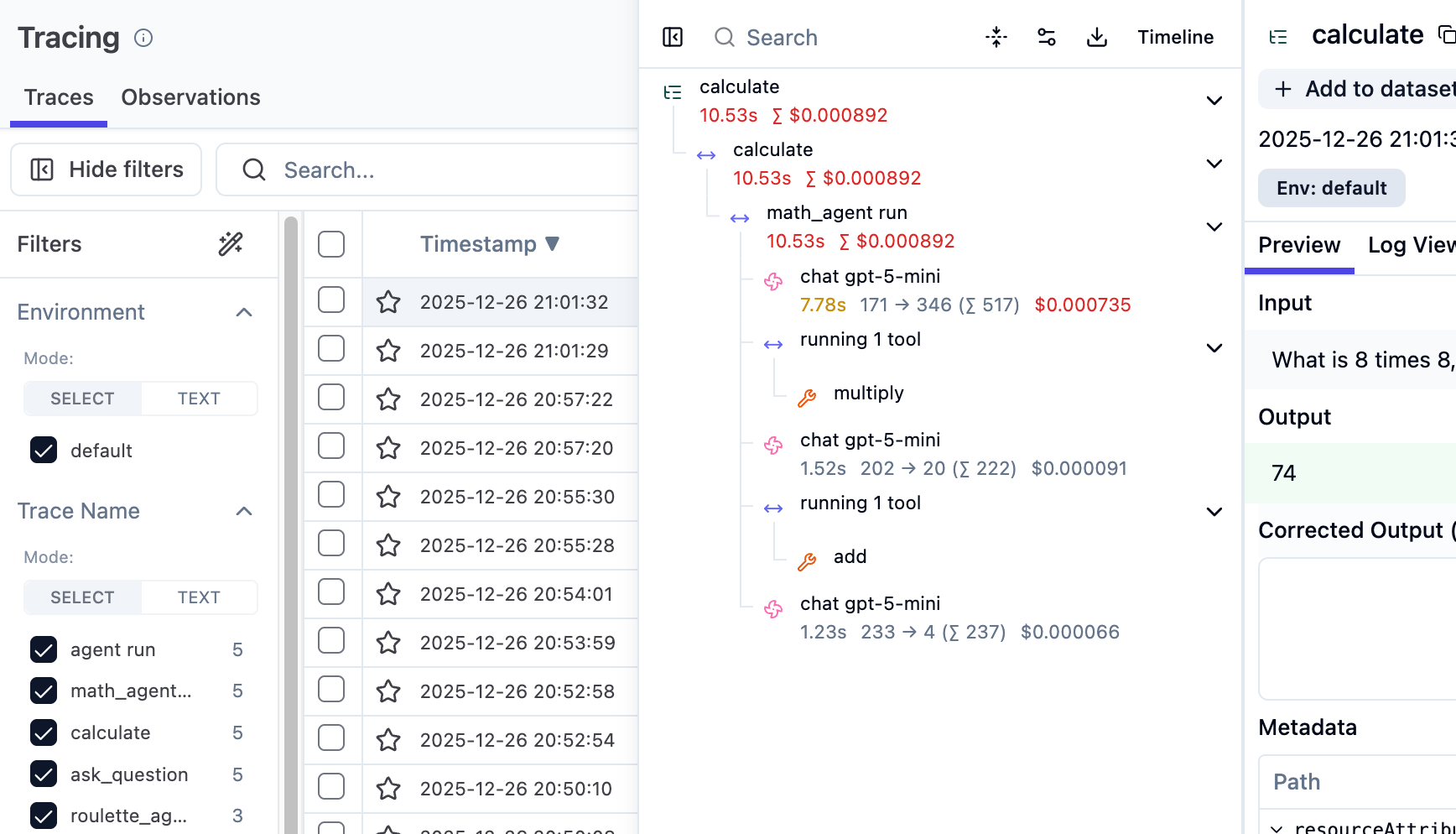
Every LLM call in your application should be traced. Capture the inputs, the outputs, latency, token usage, and cost. This isn’t optional for production systems. You need this data to debug issues, understand costs, and improve quality over time.
Tools like Langfuse and Braintrust make this easier. The important thing is visibility.
Testing LLM applications is different from traditional software. Outputs are non-deterministic: same prompt, different responses. A “good output” is often subjective. Your regular code should have normal unit tests with mocked LLM responses. For LLM behaviour itself, you need evaluation.
Build a dataset of test cases with inputs and some notion of good outputs (“can you define what good output means?”). Run your application against these regularly. Check that outputs contain required fields, or use another LLM to judge quality. Run evals on every significant change to catch regressions.
Evals are the only way to confidently modify prompts and logic without breaking things.
Stage 6: Deployment
Your application isn’t done until it’s running reliably for real users.
For hosting, you have options. Docker + VPS. Platform-as-a-Service providers like Render let you deploy without thinking about infrastructure: push your code and it runs. For more control, managed container services like AWS ECS or Google Cloud Run give you automatic scaling and health checks without managing servers directly.
Cloud infrastructure is no fun, but it’s often necessary in the real world. Keep things simple if you can. A PaaS that handles the boring stuff lets you focus on your actual application. Only move to more complex setups when you’ve genuinely outgrown the simple option.
Set up proper CI/CD so deployments are automated. Make it easy to roll back when something goes wrong. Have logs you can search, traces to see what agents are actually doing, dashboards that show what’s happening, and alerts for the important stuff.
Stage 7: Security and Compliance
Security is no longer an afterthought: it’s often the reason AI projects get killed.
Data privacy comes first. Don’t send customer data to third-party providers like OpenAI unless you know what you’re doing. Understand your data processing agreements. Know where your data is stored and who can access it. Many promising demos become liabilities the moment real customer information flows through them.
LLM applications have unique attack surfaces:
Prompt injection is where malicious inputs that try to override your system instructions and make the model do something unintended.
Data leakage happens when your model accidentally reveals sensitive information from its context.
Practical tools to protect your applications:
LLM Guard - scans inputs and outputs for prompt injections, toxic content, and data leakage.
Garak - command-line vulnerability scanner for LLMs from NVIDIA. Red-team your own application before someone else does.
Human-in-the-loop (HITL) isn’t just a UX pattern: it’s a security architecture. For high-stakes actions, require human approval before the system executes. This catches both model errors and successful attacks.
A note on local inference: Tools like Ollama let you run models locally, keeping data off third-party servers entirely. This sounds appealing for privacy, but running your own inference is a full-time job done properly. You’re now responsible for hardware, scaling, model updates, and performance optimisation. Use this as a last resort when compliance requirements leave no alternative: not as a default choice.
The pattern is straightforward: validate inputs before they reach your model, monitor outputs for sensitive data, require human approval for high-stakes actions, and log everything. This isn’t different from securing any other application: it’s just that the attack vectors are newer.
The Path Forward
Here’s what to remember:
You’re a software engineer first. The fundamentals matter more than the frameworks.
Learn the APIs directly. Understand what’s underneath before reaching for abstractions.
Start simple. Boring patterns win. Frameworks aren’t necessary.
Think about production early. Where you deploy matters. So does security.
Build things. A GitHub full of working projects beats any credential.
The path to AI Engineering is simpler than it looks. You don’t need every framework. You don’t need to chase every new tool. You need solid engineering fundamentals, direct experience with LLM APIs, and the judgment to keep things as simple as possible.
The demand for people who can build reliable AI applications far exceeds the supply. If you put in the work to develop genuine skills, you’ll find plenty of opportunities.
Now go build something.
Thanks for reading. Have an awesome week : )
P.S. If you want to go deeper on building AI systems, I run a community where we build agents hands-on: https://skool.com/aiengineer