
The 7 stages of building software with AI (with prompts you can steal)
Real prompts for planning, building, reviewing, and shipping software with AI agents

Every week there’s a new AI coding framework that promises to revolutionise how you build software. A new agent. A new spec driven agent workflow. A new way to structure your prompts that will supposedly change everything.
Most of them are packaging the same ideas with different names, and if you’re feeling overwhelmed by all of it, I think stepping back and looking at the big picture is more useful than chasing the next tool.
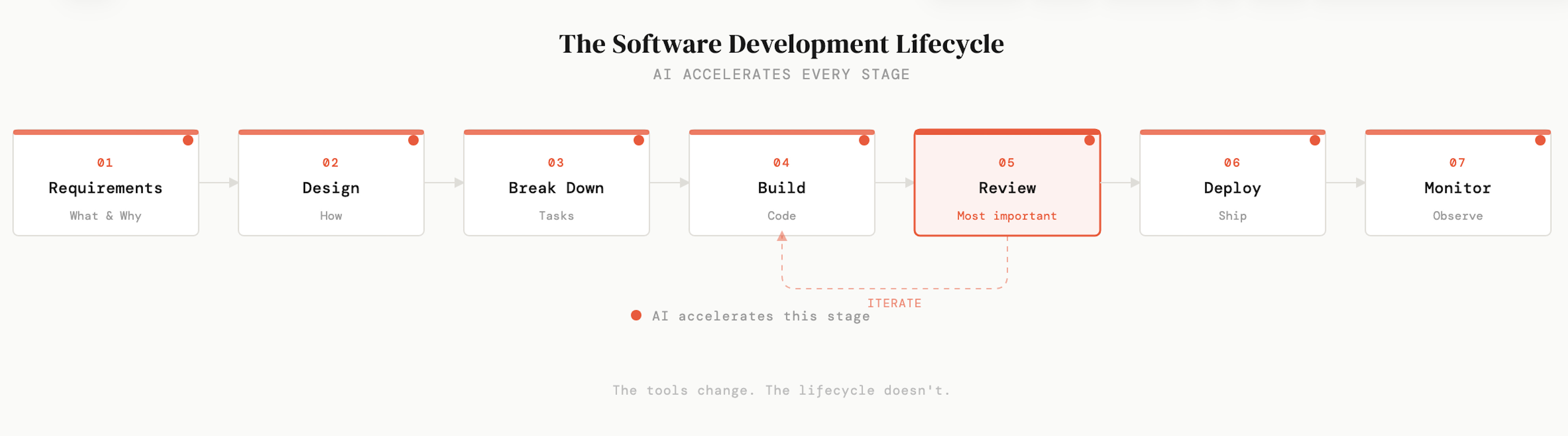
Here’s what I mean. Every piece of software ever built, at Google, at a two-person startup, on a weekend project, went through some version of the same lifecycle. Requirements. Design. Task breakdown. Build. Review. Deploy. Monitor. The tools change constantly. The lifecycle doesn’t. It hasn’t changed in decades, and a new AI framework isn’t going to change it now.
What has changed is that AI now accelerates every single stage of that lifecycle, not just the coding step. And most people are only using it for one part, code generation, and leaving enormous value on the table everywhere else.
I want to walk through all seven stages, share how I actually use AI at each one, and give you specific prompts and examples that have worked well for me. Some of this might seem obvious to experienced engineers, but I’ve been building software for over twenty years and I still find it useful to step back and look at the full picture. Especially now that the tools have changed so dramatically.
If you want a full video: get it here.
Why planning still matters, even when building is fast
On a recent client project, I spent three full days on research and planning before I wrote a single line of code. That probably sounds like a long time when you could just open a terminal and start prompting an agent.
But here’s what happened: because I had a clear plan, requirements, technical design, key decisions all documented, I could constantly go back to it as I was building. When I hit a fork in the road, the plan had already made the decision for me. When the agent drifted in a direction I didn’t want, I could point it back to the spec. Over the course of the project, those three days of planning saved me far more time than they cost. The project went smoothly in a way that felt almost unusual.
One benefit I didn’t expect: because the requirements were so clearly defined, when it came time to write evals, the agent was able to generate large numbers of them almost automatically. It knew exactly what the software was supposed to do, so it could test against that. Without those clear requirements, the agent wouldn’t have had enough context to generate useful evals at all. That’s a downstream benefit of planning that you don’t really see until you’ve experienced it. The clarity compounds through every later stage.
If I hadn’t done that planning, I know exactly what would have happened, because I’ve seen it play out dozens of times over my career. You rush into building, you make a decision about your database schema or your auth strategy that feels fine in the moment, and then three weeks later you realise it was wrong. But by then your software is in production, customers are using it, and the cost of reversing that decision is so high that most teams just live with it. I’ve watched teams carry bad architectural decisions for years because someone rushed the planning phase. That’s not a hypothetical. It’s one of the most common patterns in software engineering.
So the first two stages of the lifecycle are requirements (what are we building and why) and technical design (how are we building it). AI is useful at both. You can have a real conversation with Claude about your architecture, ask it to challenge your assumptions, even prototype multiple approaches quickly to see which one feels right. But the thinking still needs to happen. You need to own these decisions.
Here’s a simple requirements template that works well:
What: User authentication system
Why: Users need accounts to save preferences
Who: End users of the web app
In scope: Email/password login, signup page
Out of scope: OAuth, password reset (v1), admin roles
That “out of scope” section is quietly one of the most useful things you can write. It stops scope creep before it starts, and it gives the agent a clear boundary for what not to build.
Breaking work down is where most people go wrong
The third stage is task breakdown, and this is the one that makes the biggest difference to the quality of what you get from AI coding agents.
The instinct is to hand an agent your entire project and say “build this.” Don’t do that. You’ll get a mess of code that’s hard to review, hard to test, and hard to understand. What you want instead is a series of small, clear, bounded tasks. Each one with enough context that the agent can do it well without needing to hold your entire application in its head.
I use a prompt like this to break a spec down into tasks:
Read the spec in .ai/specs/auth.md.

Break it down into independent work items that can be completed
one at a time. Each work item should have a clear title, a short
description of what needs to be done, and any dependencies on
other work items.

Once you have the list, push each work item to Linear as a new task.
And then when I hand a specific task to Claude Code, I give it real context:
Task: Create the login API endpoint
Context: We're using FastAPI with SQLAlchemy async.
Auth is JWT tokens in httpOnly cookies.
User model is already defined in app/models/user.py.
Follow the existing pattern in app/routers/health.py.
The difference between this and a vague “add login” prompt is night and day. An LLM is making hundreds of small decisions as it writes your code. Naming conventions, error handling patterns, where to put things. If you give it context, those decisions are well-informed. If you don’t, it guesses, and it guesses in ways that feel plausible but don’t fit your application.
Review is the step that changed my workflow
I keep Claude Code open all day. I run multiple terminal sessions. And I have a slash command specifically for reviewing code. This is the part of the workflow that I think most people skip, and it’s the part that has made the single biggest difference to the quality of what I ship.
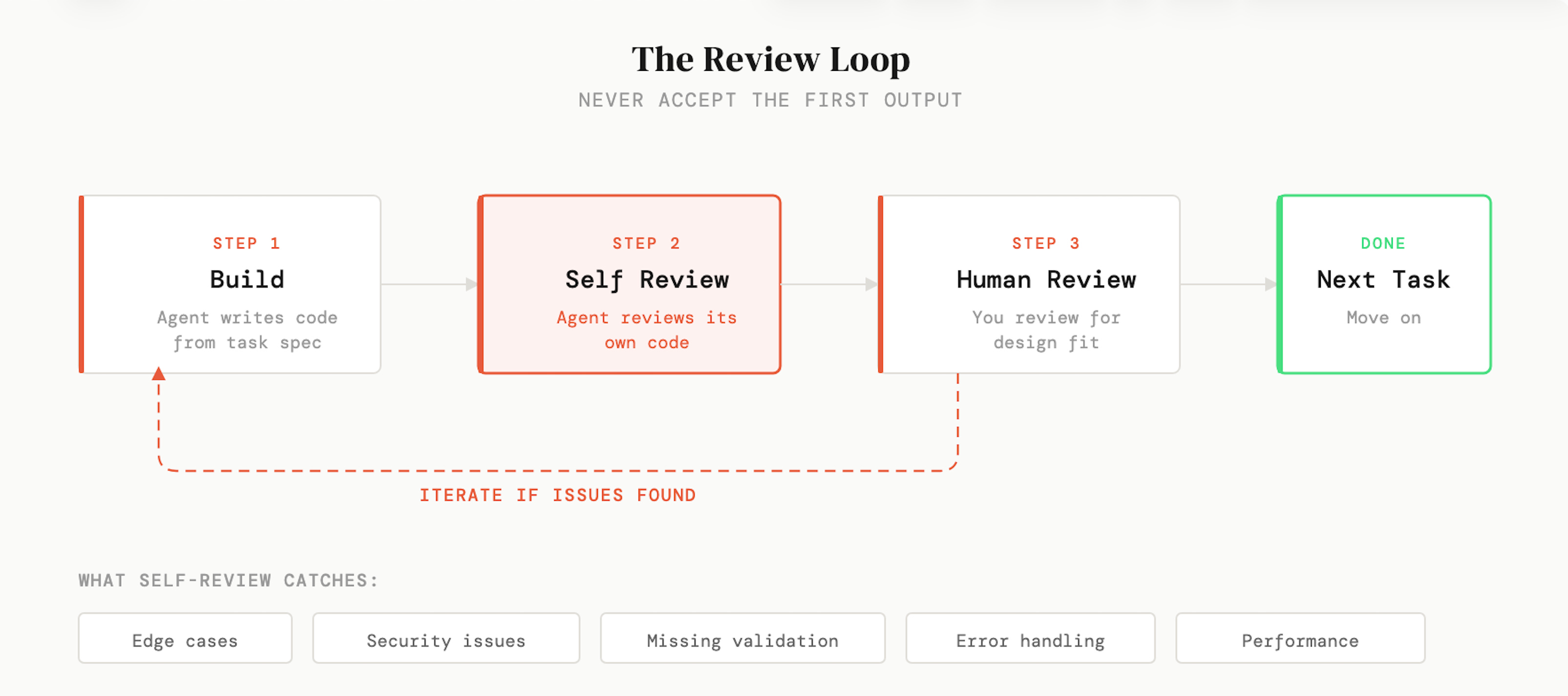
After the agent finishes a task, I ask it to review its own work:
Look at the code you just wrote. Find any bugs, edge cases,
security issues, or potential problems.
I’m consistently surprised by how much this catches. Not dramatic, application-breaking bugs. Usually small things. A missing edge case. Input validation that isn’t there. An error handling path that doesn’t quite work. But these small things compound. If every change you make introduces one minor issue, over time your codebase degrades in ways that are hard to track down later.
The reason this works is that generation and review are fundamentally different cognitive tasks (for humans and agents). When the agent is writing code, it’s focused on making things work. When it’s reviewing, it’s looking for problems. These aren’t the same mode of thinking, and almost every time I run a review pass, it finds something meaningful that it missed the first time around.
Once I’ve built out a complete feature, I’ll also do a secondary review of the whole thing end-to-end. You catch a different class of issues at that level. Things that look fine in isolation but don’t quite fit together, or patterns that are inconsistent across files. I’ve started thinking of this as just part of the work now, not an extra step.
Deploy and monitor
The last two stages are deployment and monitoring. Neither is as glamorous as the build step, but both are areas where AI has saved me more time than I expected.
For deployment, I’ve used prompts as simple as:
Commit and save these changes with a clear commit message.
Then push the latest version to GCP Cloud Run.
If you’re not deeply familiar with CI/CD pipelines or infrastructure configuration, this is one of those areas where AI genuinely shines. You can describe what you want and it will walk you through the setup or just do it for you. Things that used to take an afternoon of reading (truly awful) cloud provider docs now take minutes.
Monitoring is the stage that most people skip entirely, and then they find out their application is broken because a customer emails them about it. I’ve seen this happen more times than I’d like to admit, including on my own projects. The fix is simple: set up error tracking with something like Sentry, add uptime monitoring, configure alerts. You can ask Claude Code to integrate all of this into your application, and the whole thing takes less time than you’d spend debugging one production incident without it.
What I’ve learned after a year with Claude Code
I’ve been using Claude Code since it first launched, and at this point I use it for essentially all of my development work. But that experience has also taught me something important: it’s only a powerful tool if you know how to guide it.
Claude Code still makes a significant number of mistakes. It still makes decisions that don’t align with what you want. It still needs clear direction, careful planning, and thorough review to produce software you’d actually be proud of. The agents are getting better all the time, but we’re not at a point where you can skip the thinking and get good results. I’m not sure we ever will be, honestly. The thinking is the valuable part.
The people who are getting the most out of these tools aren’t the ones with the cleverest prompts or the most elaborate frameworks. They’re the ones who understand the fundamentals of building software (requirements, design, task breakdown, review) and use AI to accelerate each of those stages rather than trying to skip them entirely.
Every new framework that comes along is ultimately just a different way of sending text to a language model. The framework doesn’t change the quality of the output. Your thinking before you write the prompt does.
Vibe coding isn’t the enemy. Skipping the thinking is. A senior engineer who has done the design work, made the architectural decisions, and broken the work down can move fast within that structure and produce something great. Someone who skips all of that and just prompts their way through will produce a mess, no matter how good the tools are.
Do the thinking. Then you’ve earned the right to move fast.
I put together a companion repo on GitHub with all the prompts from this piece, plus the presentation slides I used in the video. Clone it, steal the prompts, adapt them to your own workflow.