
How I'm using OpenAI Codex automations to improve my code
AI agents that work for you 24/7

OpenAI just added a feature to their coding agent, Codex, that most people missed. It’s called Automations.
If you haven’t used Codex - it’s an AI coding assistant, similar to Claude Code. You give it a task in plain English (”fix this bug”, “review this file”) and it writes the code for you. Think of it as a developer on your team that you hand tasks to.
Automations let you take any task you’d give Codex and run it on a schedule. You write a prompt, pick a frequency (every morning, every 3 hours, whatever), and the agent runs that task automatically in the background on repeat. No manual prompting. You’re not at the keyboard.
I’ve been running two of these for a few weeks and they’ve caught bugs I almost certainly would have missed. One scans for issues and creates Linear tickets. The other picks up those tickets, fixes the code, and opens PRs.
This video walks through the full demo. This edition breaks down the setup and how I wired the two automations together.
The Setup
Each automation lives as a .toml file (a simple config format) inside a .codex/automations/ folder in your project. It has three things: a prompt (what the agent should do), a schedule (when it runs), and a memory.md file that persists between runs so the agent remembers what happened last time.
Here’s what the bug scanner looks like stripped down:
[automation]
name = "Bug Scanner"
cwd = "/workspace/myproject"
schedule = "0 9 * * *"  # Every day at 9am

[prompt]
content = """
You are performing a daily code review. Your job is to find critical bugs,
security issues, and unhandled edge cases in the codebase.

For each issue you find:
1. Check whether a Linear ticket already exists for this issue. If it does, skip it.
2. If it's new, create a Linear ticket with the following:
   - Title: concise description of the bug
   - Label: autofix
   - Body: summary, affected files with full paths, customer impact,
     reproduction steps, suggested fix

Use full absolute paths when referencing files. This automation runs inside
a Git work tree and relative paths will not resolve correctly.

At the end, report: X bugs found, Y skipped as duplicates.
"""
The bug fixer runs on the same schedule:
[automation]
name = "Bug Fixer"
cwd = "/workspace/myproject"
schedule = "0 9 * * *"  # Every day at 9am

[prompt]
content = """
Scan your Linear board for open issues with the label: autofix.

For each issue:
1. Read the bug description in full
2. Check out a new git branch: fix/<issue-id>-<slug>
3. Implement the fix
4. Verify the build passes
5. Open a pull request using the GitHub CLI
6. Move the ticket to In Review status

If anything fails, stop and report the error. Do not silently work around failures.
"""
The memory file sits alongside the automation config and gets updated after each run. It keeps a record of what the agent found and did previously. On the next run, the agent reads it before scanning - so it knows which issues it already reported and won’t duplicate them.
Quality
This is what surprised me most.
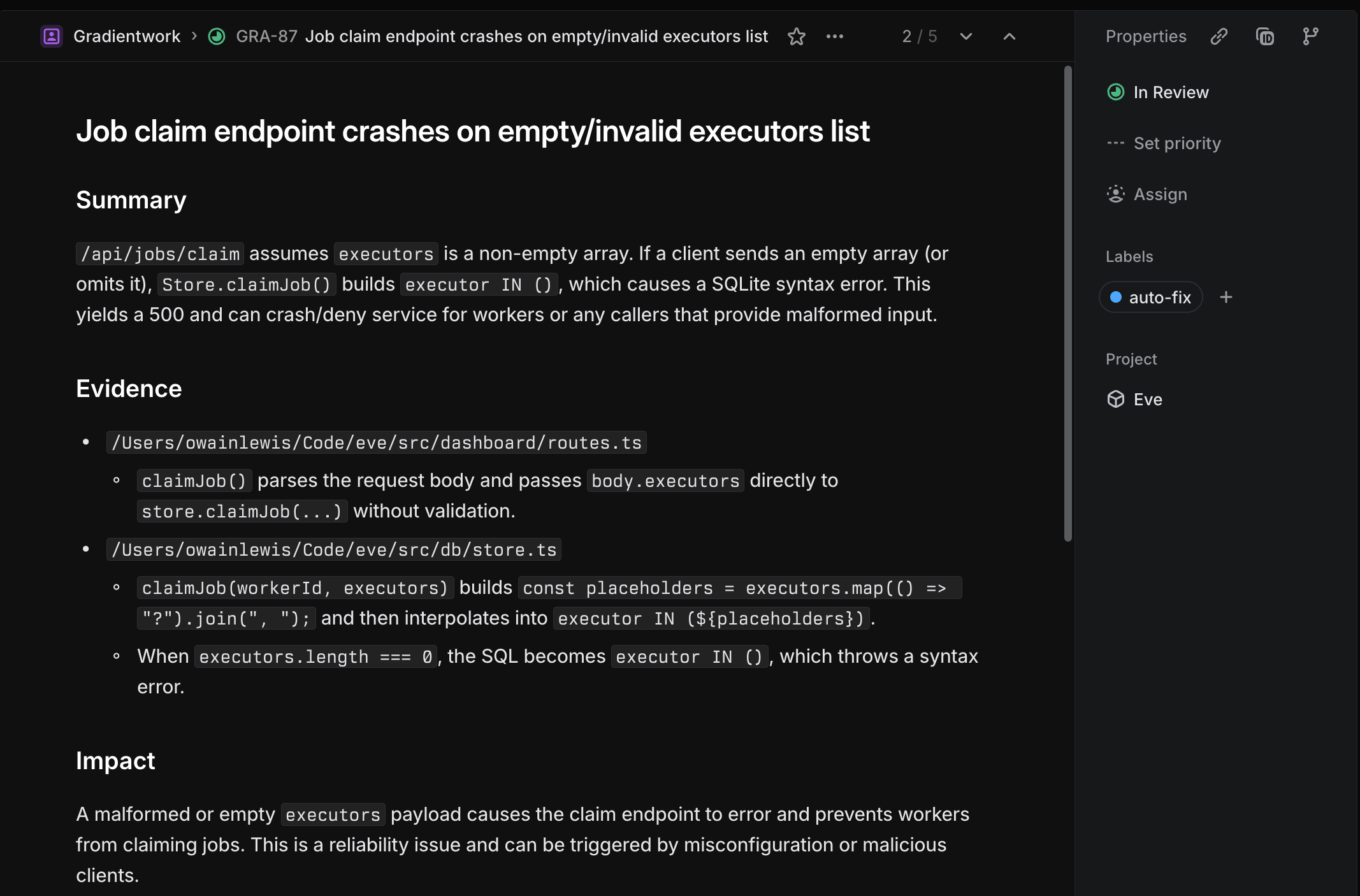
The agents write better bug tickets than most developers do.
The tickets generated by these automations had incredibly detailed descriptions, a suggested fix, and detailed steps to reproduce the issue.
Memory
Traditional automation tools like Zapier and n8n run fixed flows. They do the same steps every time. These Codex automations are different because they persist memory across runs.
After each run, the agent writes what it found into the memory file. Here’s a simplified version of what that looks like after a few runs:
# Automation Memory

## 2026-02-18
- Found 3 new issues. Created tickets: LIN-47, LIN-48, LIN-49.
- Skipped 1 issue (duplicate of LIN-44).

## 2026-02-19
- Found 1 new issue. Created ticket: LIN-52.
- Note: The webhook timeout issue (LIN-47) was fixed and merged.
  Removed from watch list.

## 2026-02-20
- No new issues found in webhook or retry modules.
- Flagged auth module for closer review tomorrow - noticed some patterns
  that could lead to session fixation under specific conditions.
On the next run, the agent reads this before starting. It knows what it already reported. It knows what was fixed. It can notice when it flagged something yesterday and follow up on it today.
What to Automate
The pattern generalises. This works in any agent environment - it’s just a prompt, a recurring schedule, and a memory file.
What makes a good candidate:
It’s something you’d do on a regular schedule anyway
A vague instruction is enough to produce useful output (you don’t need pixel-perfect determinism)
It’s safe for an agent to try and fail - the output goes somewhere reviewable before anything irrevocable happens
Bug scanning fits all three. So does dependency review, documentation checks, stale ticket cleanup, security audits, release notes, and test coverage monitoring. Anything that currently gets skipped because you’re busy is a candidate.
Where it doesn’t work well: anything where the agent needs to make a decision you’d want to make yourself, or where a wrong answer is hard to detect in review.
Summary
If you have a codebase with more than a few thousand lines, set up one scanner this week.
Write a prompt that asks the agent to do a daily code review and create a ticket for anything new. Run it manually a few times to see what it finds.
I was really impressed by this feature. The idea is simple but the impact is significant. A bug that never reaches your customers, a task you’re too busy to do that can now be done automatically, a security issue that is detected early on.
I made a video covering this in more depth here.