
How I'm building autonomous agent loops
A guide on loop engineering and autonomous AI loops

ey 👋,
You’ve probably heard a lot of hype around the term loop engineering. Very few people show you how to actually apply it. That’s what I want to do here.
The idea started with a tweet from Peter Steinberger.

Boris (Claude Code creator) said something similar. He doesn’t prompt Claude Code anymore, he writes loops, and the loops do the work.
I’ll be honest. I dislike the term. Loop engineering and harness engineering are both vague, and it’s hard to know what anyone actually means when they say them (I honestly don’t think anyone actually knows).
A plainer way to put it is building systems with agents. That’s the version I find useful.
A loop itself is simple. It’s doing something over and over. Loops have always existed in code. The new part is that we’re running an agent inside the loop. On a schedule, or when an event happens, the agent reads the state of your project, does some work, updates the state, then goes back to sleep and repeats. That’s the most basic loop you can build. One agent, one clear job, running on a schedule, able to update the state of the world.
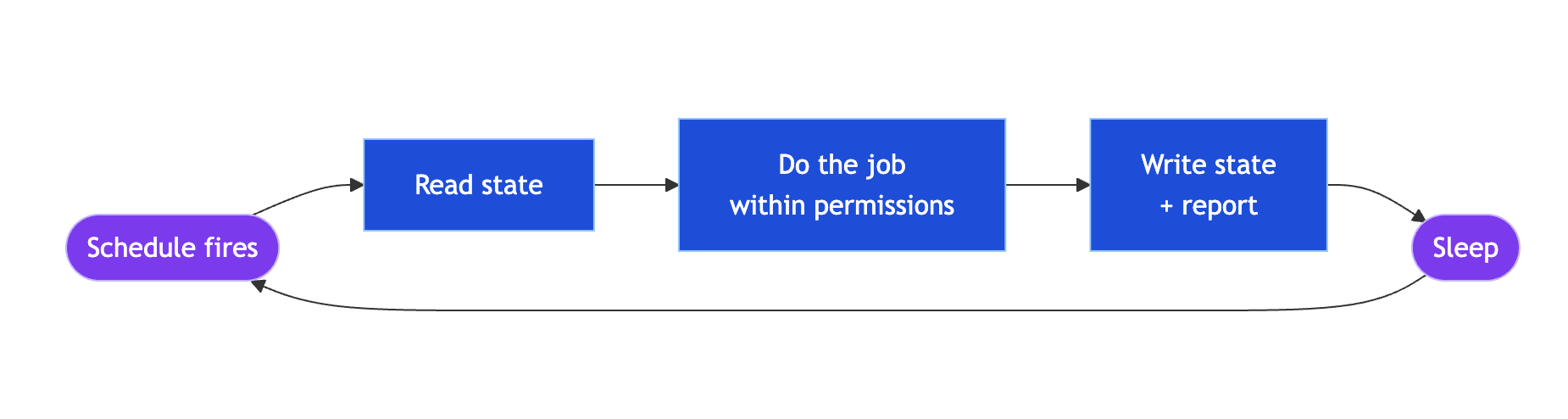
That phrase, the state of the world, matters. I also call it the control plane. When agents run autonomously, you need a way to see what they’re doing. You don’t want them running unattended with no visibility into what’s happening. That would be dangerous. So I use GitHub Issues as the control plane. You could use Linear or anything with an API. Tickets move through a status queue, from in progress to in review to done, and every ticket carries a comment from the agent showing the work it did.
In my latest video I build a system with two loops using Claude Code and Codex.
The first is the manager loop. As a former engineering manager and tech lead, one of my jobs was keeping the backlog tidy. Real boards drift. Things sit in “in progress” that are already done, things are marked “in review” that aren’t. So I use an agent to label and classify every ticket for me. It runs on a schedule, reads the backlog, classifies each ticket by risk and type, and decides whether it’s safe for an agent to work on. It can also scan the codebase and file a ticket when it finds a bug or a documentation mismatch. The guardrail is important here: this agent can’t push code or do anything destructive. The only thing it can do is manage tickets.
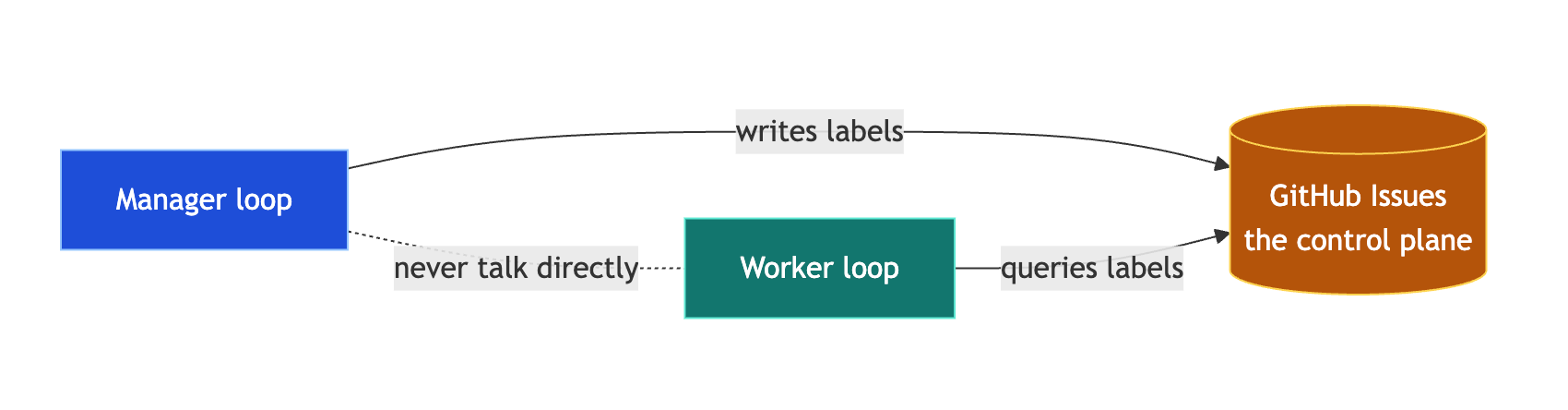
The second is the worker loop. This agent polls the backlog for tickets marked low risk and agent ready. When it finds one, it runs an inner workflow. It checks the branch is clean and aborts if it isn’t. In Codex it spins up a new thread for the ticket. Then it reads the ticket, writes the code, makes sure there’s test coverage, uses a subagent to review the diff, fixes the findings, opens a pull request, and comments on the issue with evidence of what it did. That evidence matters, the same way you’d ask a human engineer to paste test output into a PR so the reviewer can trust the work was actually done. This is the part Peter was describing. The agent is prompting itself the whole way through. We didn’t write the worker’s prompt, the system wrote it.
Note: You can steal all my personal AI coding skills here.
I cap the worker at a maximum of three issues per run. That’s another guardrail. If there’s a bug and you’ve got fifty open tickets, you don’t want an agent burning through all of them and a lot of tokens. You raise that number as you build confidence.
One more guardrail is worth calling out. Even after the agent reviews its own work, every pull request gets a second automated code review before I look at it. You can use Codex’s own review, CodeRabbit, Greptile, whatever you like. The point is the agent always gets checked by something other than itself.
I was genuinely surprised by how well this works. The idea is simple but the impact is significant. You wake up to a set of pull requests, and if you’ve built the system properly, the work is good enough to merge. But the guardrails are the real work, not the agents. This is a systems design problem. You also want to think about evaluations: how many tickets needed rework, did the agent get the code right the first time, or did you have to give a lot of feedback. Without guardrails and a way to evaluate the work, you can’t run this unattended.
I still review every pull request and make the final call. The agents just do the repetitive work around it.
Full walkthrough, with the two loops running live, is in the video here.
If you want to go deeper on building real software with AI agents, that’s what I’m building inside AI Engineer: https://aiengineer.co
Thanks for reading. Have an awesome day!
Owain